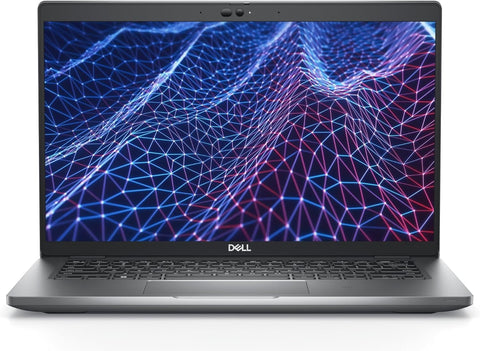
Best overall for remote work
Dell Latitude 7330
i7 · 16GB RAM · 256GB · Touch · Grade A
$439.00In stock
Three business laptops with 16GB, a built-in webcam and USB-C display support, matched to how you set up your home desk.
Best overall for remote work
i7 · 16GB RAM · 256GB · Touch · Grade A
$439.00In stock
Best 14-inch alternative
Ryzen 5 · 16GB RAM · 256GB · Grade A
$489.00In stock
| Laptop | Pick | Processor | Memory | Storage | Display | Condition | Price |
|---|---|---|---|---|---|---|---|
| Dell Latitude 7330 | Best overall for remote work | INTEL 12TH GEN CORE I7-1265U | 16GB | 256GB | 13-inch FHD 1920x1080, touch | Grade A | $439.00 |
| Dell Latitude 5420 | Best value for a home office | INTEL 11TH GEN CORE I5-1145G7 | 16GB | 256GB | 14-inch FHD 1920x1080 | Grade A | $299.00 |
| Lenovo ThinkBook 14 G3 ACL | Best 14-inch alternative | AMD Ryzen 5 5500U | 16GB | 256GB | 14-inch FHD 1920x1080 | Grade A | $489.00 |
For most people working from home, the best pick is the Dell Latitude 7330 with an Intel Core i7-1265U and 16GB of memory: a compact 13.3-inch touchscreen laptop with two Thunderbolt 4 ports that carry display, data and charging, so a single cable to a dock can run your whole desk. If you would rather have a 14-inch screen for less money, the Dell Latitude 5420 with 16GB handles the same calls and monitor setups, and the Lenovo ThinkBook 14 G3 ACL is a solid 14-inch alternative with built-in Ethernet.
We only considered models we stock in depth, so the laptop you order matches what you read here. From those, we kept business-class machines and checked each one's ports, camera and microphones against Dell's and Lenovo's own spec documents, because those details decide whether a laptop fits a home desk.
Who it is for: people who work at a desk most days but still carry the laptop to the kitchen table, a coworking space or the office now and then. It is the smallest of the three, with a 13.3-inch FHD touchscreen, a backlit keyboard and a smartcard reader, and its 12th-gen Core i7-1265U is the newest processor here.
For a home desk, the ports are the main reason it ranks first. Dell lists two USB-C Thunderbolt 4 ports with Power Delivery and DisplayPort 1.4, plus an HDMI 2.0 port, a USB 3.2 Gen 1 port with PowerShare and a headset jack. Dell's own docking list for this model includes both Thunderbolt and USB-C docks.
Who it is not for: anyone who expects to need more than 16GB later. Dell lists the 7330's memory as integrated on the system board, so it cannot be upgraded. There is no Ethernet port, so wired internet means a dock or adapter. And 256GB of storage fills up if you keep large files locally rather than in the cloud; a 512GB configuration is on the Latitude 7330 collection page.
Who it is for: anyone setting up a dedicated home office who wants the lowest cost of the three without giving up a good port selection. It has a 14-inch FHD non-touch screen and an 11th-gen Core i5-1145G7.
Dell's specifications list two Thunderbolt 4 ports with DisplayPort Alt Mode, USB4 and Power Delivery, an HDMI 2.0 port, two USB 3.2 Gen 1 ports (one with PowerShare), an RJ45 Ethernet port and a microSD slot. Dell rates the integrated graphics in these 11th-gen models for up to three external displays with the laptop screen on. It also has two memory slots, so memory can be upgraded later if your workload grows.
Who it is not for: frequent travelers. Dell lists a maximum weight of 3.03 lb and a larger footprint than the 7330. There is no touchscreen, and the processor is a generation older than the 7330's. Dell sold this model with more than one webcam option, so we do not quote a camera resolution for it.
Who it is for: people who want a 14-inch screen, built-in Ethernet and plenty of full-size ports, and who will connect a monitor or a USB-C dock rather than a Thunderbolt dock. It runs an AMD Ryzen 5 5500U, and Lenovo lists an aluminum top and bottom.
Lenovo's PSREF sheet lists two USB-C 3.2 Gen 2 ports with Power Delivery 3.0 and DisplayPort 1.4, two USB-A 3.2 Gen 1 ports (one always on), HDMI 1.4b, RJ-45 Ethernet, a card reader and a headphone/microphone jack. It supports up to three external monitors over HDMI and USB-C.
Who it is not for: anyone with a Thunderbolt dock. Lenovo lists docking over USB-C and no Thunderbolt ports. Its HDMI port tops out at 4K at 30Hz, so a 4K monitor is better on USB-C, which Lenovo rates for 4K at 60Hz. It is also not always the cheapest of the three, so compare the live prices in the cards above.
All three have a built-in webcam and a microphone array. Lenovo lists the ThinkBook's camera as HD 720p with a privacy shutter, and a dual-microphone array with AI-based noise cancelling. Dell lists dual-array microphones on the Latitude 5420 and noise-canceling microphones on the 7330. Dell offered both Latitudes with more than one camera, so check the listing if resolution matters to you.
Two simple habits also help: face a window or lamp rather than sitting with one behind you, and use a headset if you share the room with someone else who is on calls.
If you already own a dock, match it to the laptop: a Thunderbolt dock points to one of the two Dells, a USB-C dock works with any of them.
The 7330 measures about 12.1 by 7.9 inches, against about 12.7 by 8.4 inches for the 5420 and 12.7 by 8.6 inches for the ThinkBook, per Dell and Lenovo. All three screens are 1920 x 1080.
If the laptop will sit next to an external monitor most of the day, the smaller screen barely matters and the 7330's size is a plus when you do take it out. If the laptop screen is your only screen, a 14-inch model is easier for keeping a call and a document side by side.
Remote work stacks apps: a video call, a chat app, a browser with many tabs and a spreadsheet are often open together. 16GB gives that mix room to breathe, which is why every pick here has it. Plan ahead on upgrades: the 7330's memory cannot be changed, the 5420 has two memory slots, and Lenovo lists the ThinkBook with memory soldered to the board plus one memory slot. Higher-memory configurations of the 5420 and ThinkBook are on their collection pages.
Pick the model that matches your desk, then choose memory and storage on its collection page: Dell Latitude 7330, Dell Latitude 5420 or Lenovo ThinkBook 14 G3 ACL. To compare everything in stock, browse all laptops. Shipping is free FedEx 2-day in the US. Setting up several people at once? Request a bulk quote. Questions about ports or docks? Contact us.
Sources: Dell Latitude 7330 spec sheet, Dell Latitude 5420 Setup and Specifications, Lenovo PSREF ThinkBook 14 G3 ACL.